User Guide
Introduction
How to decrease the abandonment cart rate by 66% and increase conversion rate by 30% into loyal customers while checkout step is the first impression when any buyer comes to e-commerce store? The fastness and convenience during interactive process to your website are the best solution for that. That is the reason why Magento One Step Checkout is created and developed.
Extension: One Step Checkout Extension Code: magecheckout_securedcheckout
How to use
With Magento One Step Checkout extension, instead of separate pages of order steps, all of them are both on one page called as Page Checkout. Therefore, the information of order is under control of customers very well.
Checkout page overview
After hitting on Process to checkout, customers will be redirect into the Secured Checkout page. Here they can see the difference between the Step-by-step default Checkout page of Magento and Secured Checkout page.
The Checkout page include 6 steps: Checkout Method, Billing Address, Shipping Address, Shipping Method, Payment Method and Order Review

Login / Sign up

Forgot password

Create account
If Customers don’t have an account in your site, they can create one right away by providing password in the Billing Address section. This password together with the email address they fill in will be their login information next time.

Billing Address
Shipping Address

When customers change information on Billing address or Shipping address, others step that related to Billing/Shipping address will be updated by ajax automatically.

Payment method

TAX/ VAT Number

Order review

Coupon

Order comment ready

Survey question

Display rules

Thank you page

How to configure
Login to Admin Panel -> One Step Checkout. You will be navigated to the One Step Checkout Configuration page where you can set up, configure our module to get it to work as you wish.

Click on Setting tab, the necessary configurations are shown clearly. The change in the back-end will be appeared on the front-end exactly.
General configuration
One Step Checkout allows editing any title on checkout page without any difficulty.

Enable Secure Checkout
Select Yes: Active Magecheckout One Step Checkout as default checkout in your store.

Checkout Description
Checkout description on the checkout page. See image above.


Allow shipping To Different Address
Allow customers can shipping to different address from billing address.
Use Google Maps Suggestion Technology
If Yes, Address fields in Billing address and Shipping address will be suggested by oogle Maps Suggestion Technology like this below image

Display Configuration


Gift Message
Allow Gift message in checkout page for the entire order or individual items

Enable Gift Wrap
If Yes, the gift wrap feature will be on.
Gift wrap fee
Select gift wrap per order or per item.
Show Newsletter Checkbox
Display newsletter checkbox in checkout page

Allow checking automatically “Sign up to our newsletter” checkbox
Address Fields Configuration

In Address Field Configuration, admin can drag-drop to change the order of attributes and default what field is required as need. Moreover, enable to add or remove any one easily by clicking on symbol “+” or “-”.
Trigger Configuration
In Trigger Configuration, establish a close relation between trigger elements and reload sections. If there is any change of information in the trigger elements, the assigned sections admin configured are reloaded by Ajax Loading technology. Specifically as Address Trigger Configuration, you can see the following configuration:

Shipping Method Trigger

And then the following image is the response for such settings:

Similarly to Address and Shipping Method Trigger, you can configure for Payment Method, Cart Items, Gift Wrap, Coupon and EU VAT and check directly on the front-end.

Design Configuration

Checkout Page Layout
Select page layout: 1, 2 or 3 columns
Heading
Select icon or number to show on checkout page, for example:

Beside 8 popular colors for background color, text color and Place button color, supply 9th color that you can freely custom depends on needs of yourself.
Terms and Conditions (TOS)
If Enable, Term and Condition will be shown on checkout page. Admin has rights to default that customers have read TOS or not

Terms and conditions content
Enter the TOS content in the back-end which is allowed:
- Insert Widget

- Insert image

- Insert Variable {{i}}
Then, the pop-up box will appear respectively on the front-end.

Survey Configuration
You will create small survey about your customers. It can be short questions such as customer’s favourite or related to your shop’s information. That will help build close relationship between sellers and buyers, simultaneously, understand them more deeply.


Import Configuration

Thank You Page
This is the thank you letter you should say to your customers who have always completed their orders on your site. The page will appear right after the order is successful.

Enable this functionality by choosing Yes in Setting subtab This is an instruction of thank you page. You can custom it in CMS static block.
Display Rules
Allow you to place promotion banners with content configured in Promotions -> Display Rules
Abandoned cart email notification
Download latest version of Abandoned cart email notification here , then install it by following the Installation Guide
This version is fully compatible with Magecheckout One Step Checkout extension.
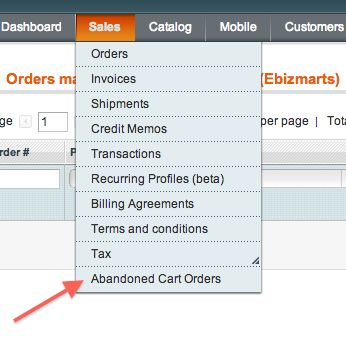
After installed successfully you will see the following menu.