How to optimize Magento performance
In this post, we will show you how to optimize Magento performance as well as the important the speed of a Magento store is. This guide arm to help every Magento users can optimize your own store. There are many posts outside with tips, strict how to increase Magento store’s performance. But in this guide, we will show you step by step to implement and increase the speed of your Magento store.
The speed of a site is not only important to Magento store, but also important to any visitors, users. A faster site can make customers happy, happy customers, generating more sales. If your site loading is slow, it will make abandoned visitors and go to competitor sites. That why the speed is an important role in the success of eCommerce websites.
Enable Magento Cache
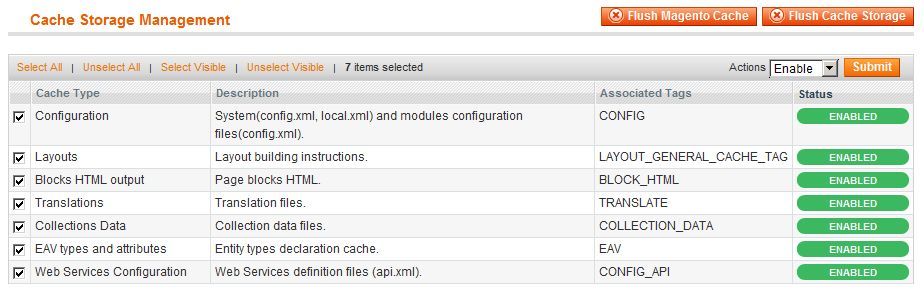
This is the first thing we need to do. Enable all Magento caches: Admin panel > System > Cache management > Select All > Actions: Enable > Submit.
Use Flat Catalog to decrease database queries
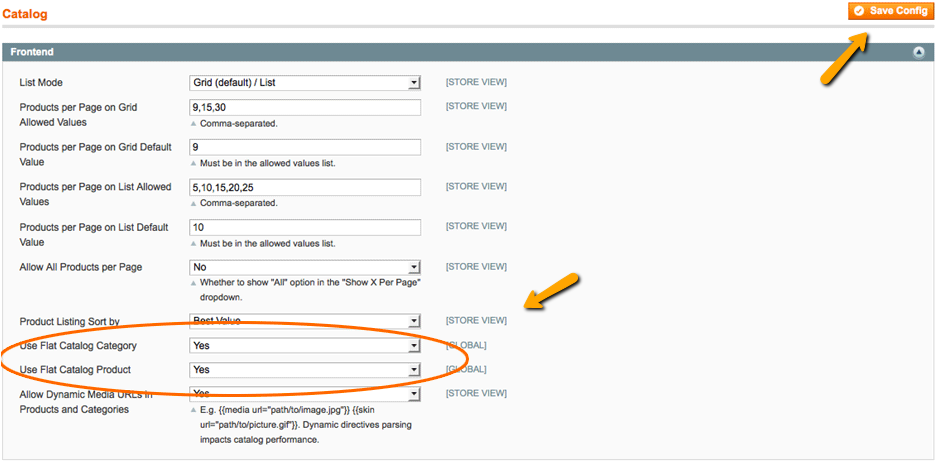
Using Flat Catalog Category and Flat Catalog Product is a great solution for optimizing Magento store. This will help to reduce queries to database a lot.
Access to your Magento Admin Panel then System > Configuration > Catalog > Catalog > Frontend
Enable “Merge JavaScript Files” and “Merge CSS Files”
Magento allows admin merge Js, CSS files into single file. It also compresses them with minimum size. It helps browser load much faster by loading one JS file and one CSS file instead of waiting for multiple JS, CSS files.
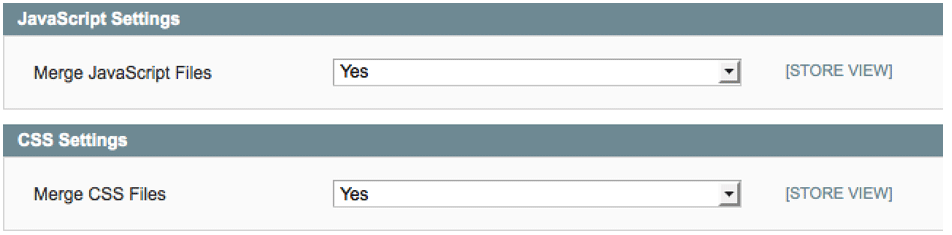
Go to Admin panel: System > Configuration > Advanced > Developer
You will see Merge JavaScript Files and Merge CSS Files tabs. Now enable it then Save config.
Install Full Page Cache
Full Page Cache is a 3rd-party module for Magento store. It optimizes Magento default cache and make that store run faster. We recommend the following Full Page Cache module:
- Nitrogento
- Miravist
- Magegiant
- Mageworx
Edit .htaccess file
In this part, we will show you how to modify .htaccess file and make your site running much faster. If your server is running Nginx, you can follow this post how-to-optimize-magento-performance-with-nginx
Enable Output Compression
Now we will enable mod_deflate on .htaccess file. It will compress (Gzip) text, javascript before transmits to a client browser. So the browser will load faster because of smaller files. To enable it you can uncomment some lines which look like the following:
<IfModule mod_deflate.c>
    SetOutputFilter DEFLATE
    AddOutputFilterByType DEFLATE text/*
    BrowserMatch ^Mozilla/4 gzip-only-text/html
    BrowserMatch ^Mozilla/4\.0[678] no-gzip
    BrowserMatch \bMSIE !no-gzip !gzip-only-text/html
    SetEnvIfNoCase Request_URI \.(?:gif|jpe?g|png)$ no-gzip dont-vary
    SetEnvIfNoCase Request_URI \.(?:exe|t?gz|zip|bz2|sit|rar)$ no-gzip dont-vary
    SetEnvIfNoCase Request_URI \.pdf$ no-gzip dont-vary
    SetEnvIfNoCase Request_URI \.(?:gif|jpe?g|png)$ no-gzip
</IfModule>
Enable Expires Headers
All browsers are using Expires Headers to determine how long save static data in a browser cache. All pages should have expires headers. And all static files such as images, javascript, CSS files should have longer expires headers.
Enable it you can uncomment ExpiresActive On like:
<IfModule mod_headers.c>
    Header append Vary User-Agent env=!dont-vary
</IfModule>

<IfModule mod_expires.c>
    ExpiresActive On
    ExpiresDefault "access plus 2 hours"
    # IMAGES
    ExpiresByType image/jpg "access plus 1 week"
    ExpiresByType image/jpeg "access plus 1 week"
    ExpiresByType image/png "access plus 1 week"
    ExpiresByType image/gif "access plus 1 week"
    AddType image/x-icon .ico
    ExpiresByType image/ico "access plus 1 week"
    ExpiresByType image/icon "access plus 1 week"
    ExpiresByType image/x-icon "access plus 1 week"
    # FAVICON
    ExpiresByType image/vnd.microsoft.icon "access plus 1 month"
    # CSS
    ExpiresByType text/css "access plus 1 month"
    # HTML
    ExpiresByType text/html "access plus 0 seconds"
    ExpiresByType application/xhtml+xml "access plus 0 seconds"
    # JAVASCRIPTS
    ExpiresByType application/javascript "access plus 1 week"
    ExpiresByType text/javascript "access plus 1 week"
    ExpiresByType application/x-javascript "access plus 1 week"
    # FLASH
    ExpiresByType application/x-shockwave-flash "access plus 1 month"
</IfModule>
Important
If you are using long expires header, you can change file’s name whenever the file changes.
Disable ETags
Disabling ETags as the following:
## http://developer.yahoo.com/performance/rules.html#etags
FileETag none
Other recommended configuration
Limit the number of products on a product overview page
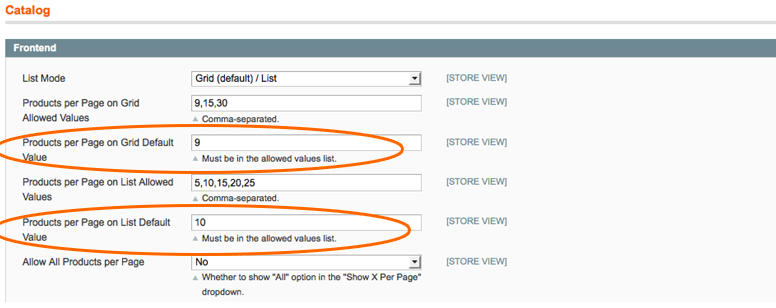
You can optimize the database queries by limiting a number of products in product listing page.
System > Configuration > Catalog > Catalog > Frontend
Disable the Magento log
Enabling log is good for developing the state. But when your site go live, you should disable it for better performance.
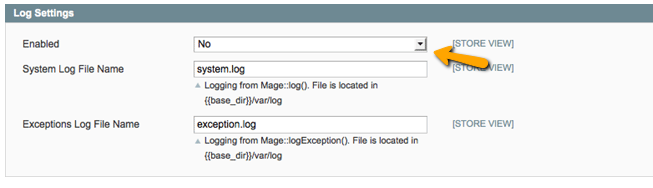
Go to System > Configuration > Advanced > Developer > Log Settings then Select Disable > Save Config
Enable cron-job and log cleaning
Setup scheduled tasks for cleaning up the log file. We can setup about clean log for every 20-30 days
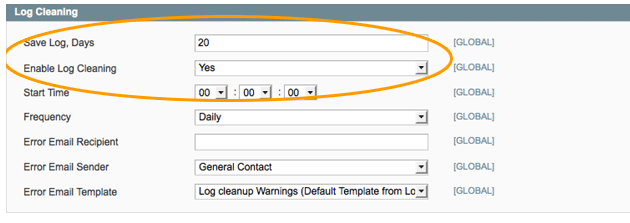
Go to System > Configuration > Advanced > System -> Log Cleaning
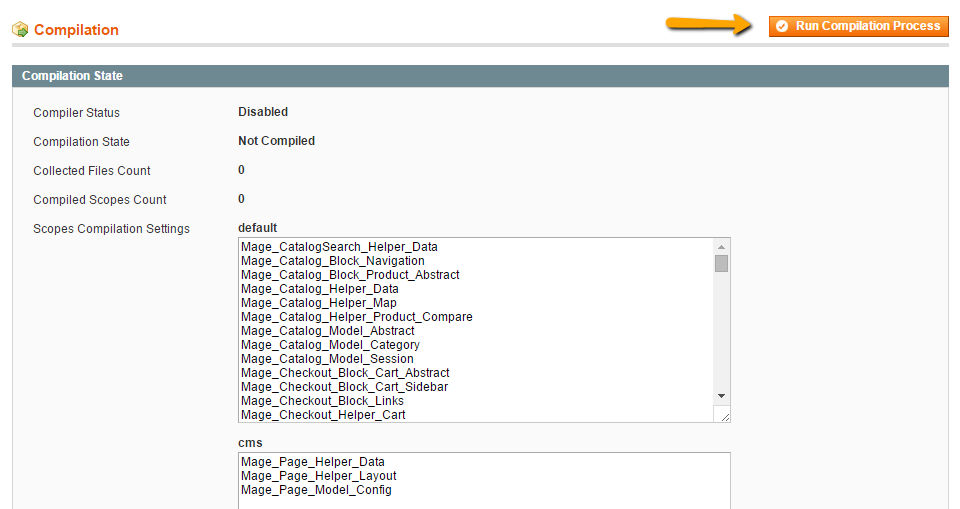
Enable Compilation
Use Magento’s Compilation feature. It’s reported to give you a 25%-50% performance boost: System > Tools > Compilation then click on Run Compilation Process
Setup CDN
Follow this tutorial: How to setup CDN for Magento site
Boost sales with Magento One Step Checkout extension and Magento One Step Checkout